The short version
- The symphony now owns and runs its own website. We no longer rent it from Squarespace.
- Anyone on the team can update it from a simple “control panel”, with big “What is this page?” help buttons.
- Every quarter gets its own News page, like a newsletter that never ends up in the trash. Each one stays online, so people can come back and give at any time.
- These pages help people find us on Google, and they make sharing on Facebook and by email as easy as copying one link.
- The website is “AI ready”. An AI assistant (a computer program that can read and write) already helps draft each quarter’s page and answers your questions about the control panel. A person always approves before anything new goes public.
What’s inside
- 1What we did
- 2Five words to know first
- 3A newsletter that never ends up in the trash
- 4The quarterly giving pages
- 5How people find us on Google
- 6Word of mouth, online: “backlinks”
- 7Facebook, email and sharing made easy
- 8The control panel, step by step
- 9Our new quarterly routine
- 10Problems this solves
- 11Becoming “AI ready”
- 12Safety, cost and who’s in control
- 13What the board can do now
- 14Word list
What we did
We moved the symphony’s website to a new home that the symphony controls, and added tools that make it easy to keep up to date.
Before, our website was like a shop in a rented building. The landlord (a company called Squarespace) set the rules, charged rent every month, and only someone who knew their system could rearrange the shelves.
Now the symphony owns the building. We hold the keys, we can rearrange anything ourselves, and there’s a front desk with a friendly guide (the help buttons) for anyone who gets stuck.
The changes, one by one
- A new home for the website. vallejosymphony.org now runs on Cloudflare, a large, well-known company that keeps millions of websites fast and safe. Every page from the old website was copied over. Visitors see the same symphony, with the same concerts and the same Tickets and Donate buttons.
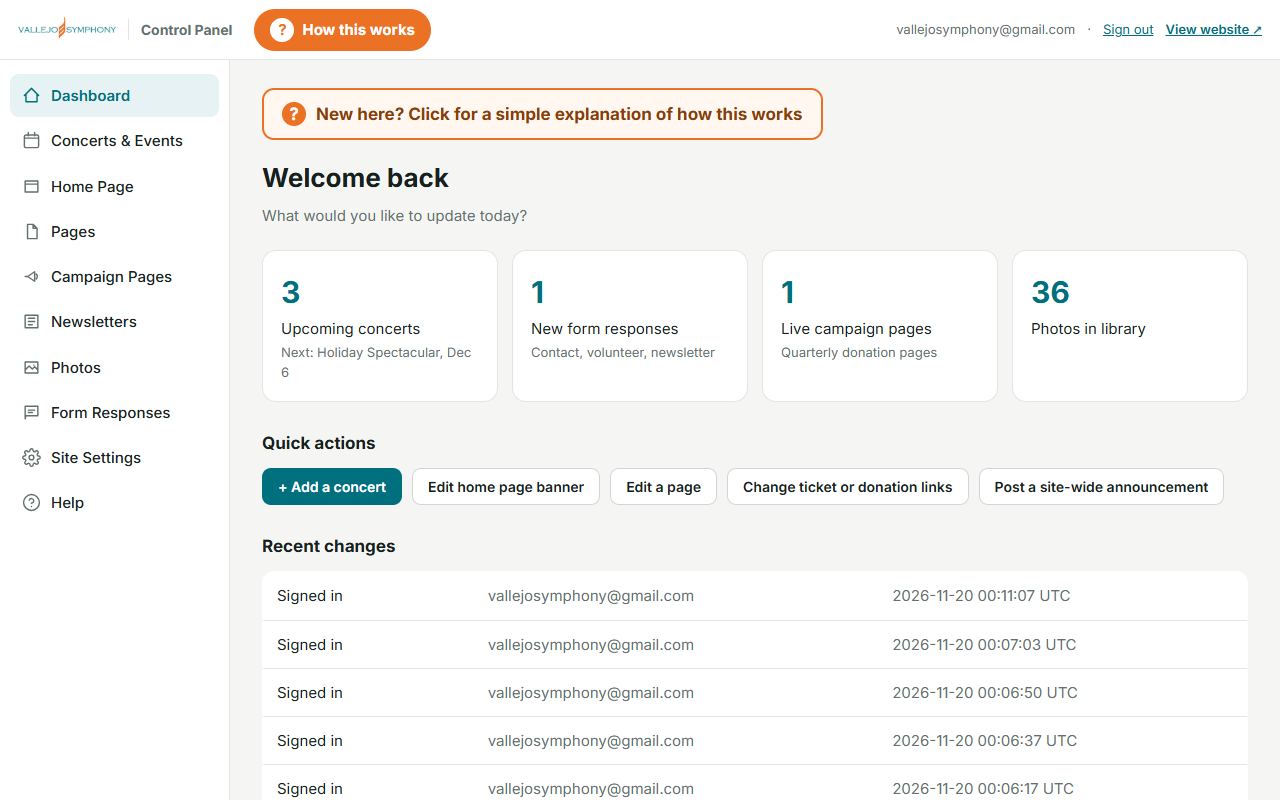
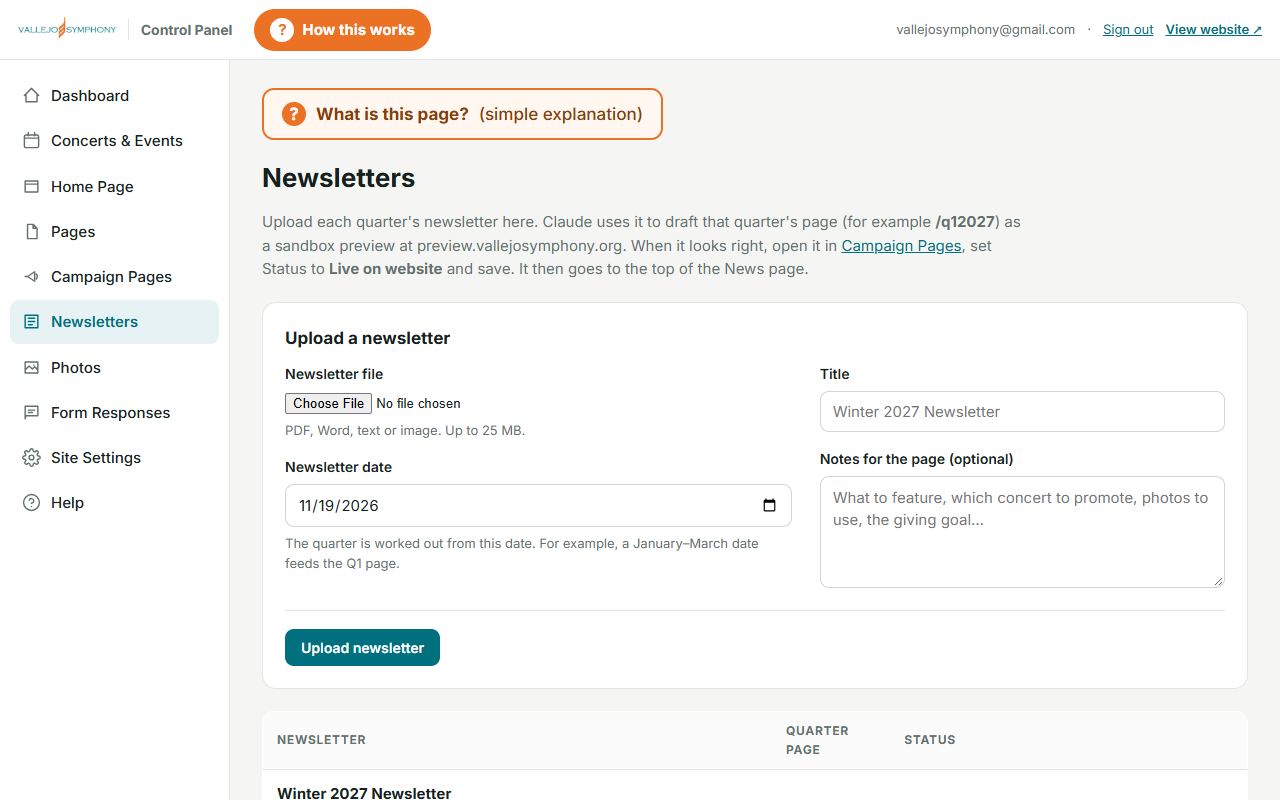
- A control panel at updates.vallejosymphony.org. It’s a private page where approved people change the website by filling in boxes, the way you’d fill in a form. There’s no code to learn.
- A “News” section on the website, listing every quarterly update, newest first. The older ones stay available below it as a history.
- Quarterly giving pages, such as vallejosymphony.org/q42026 for this year-end. Each is one focused page with one clear Donate button, made for sharing on Facebook and by email.
- A place to upload each quarter’s newsletter. An AI assistant reads it and drafts that quarter’s page for us to check.
- A private “practice” copy of the website (preview.vallejosymphony.org), where new pages can be checked before the public sees them.
- Sign-in with a code sent to your email. There are no passwords to remember or forget.
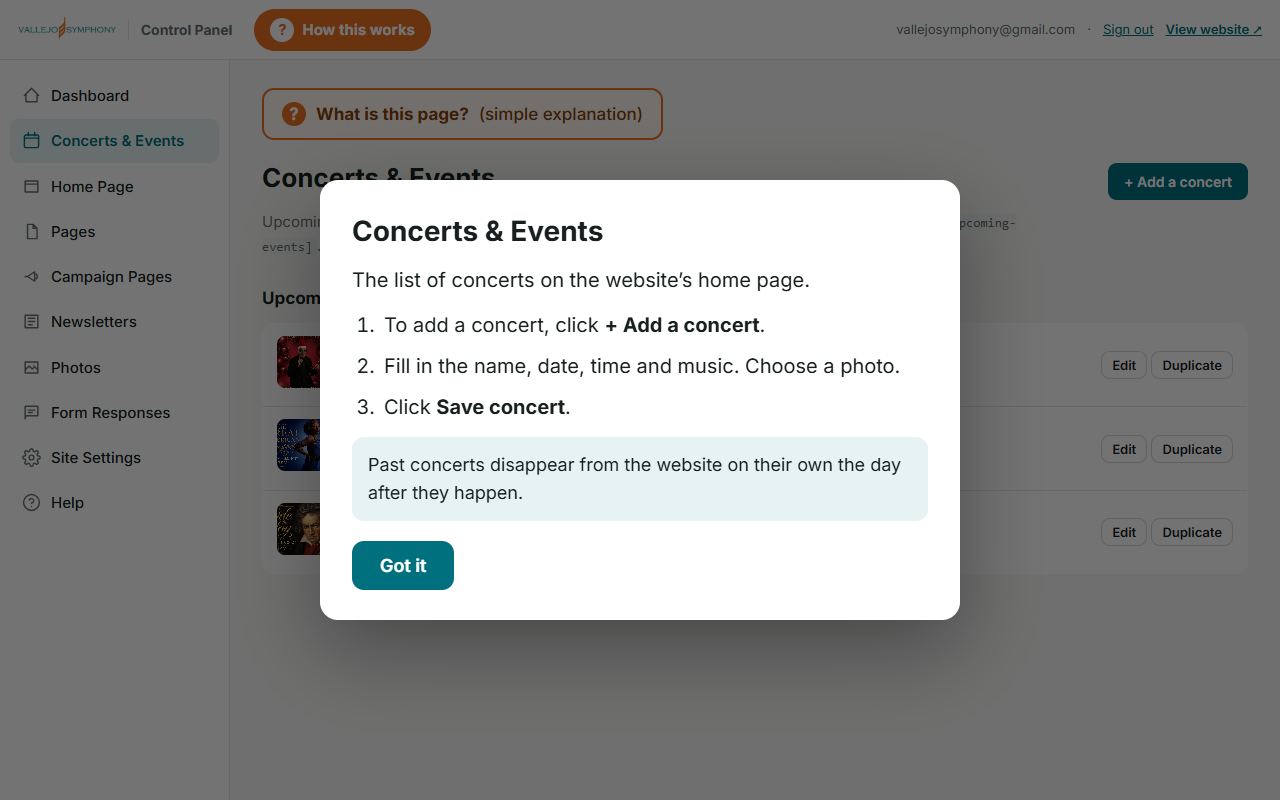
- Built-in help: a “How this works” button on every screen, a “What is this page?” button in every section, a list of common questions, and a box to ask your own.
- Website forms that save everything. Messages from the Contact form, volunteer offers and newsletter sign-ups are kept in the control panel and can be opened in Excel.
The symphony’s email works exactly as before. Tickets and donations still go through Arts-People, the same secure checkout as always.
Five words to know first
You don’t need to be technical. These five ideas are enough to follow the rest.
- Website
- A collection of pages you read on a computer, tablet or phone. Think of it as the symphony’s brochure, program book and box office, open day and night.
- Web address (or “link”)
- The name you type to reach a page, like vallejosymphony.org/news. It’s like a street address: anyone who has it can go straight there. A “link” is that address made clickable, usually underlined or shown as a button.
- Browser
- The program you use to visit websites: Chrome, Safari, Edge or Firefox. It’s the “window” you look through.
- Google (search engine)
- A free service that finds web pages for you. You type a few words, like “concerts in Vallejo”, and it shows a list of pages that match. It works like a librarian who has read every book in the library.
- Facebook (social media)
- A website and phone app where people share news, photos and links with friends and family. It works like a giant community bulletin board that everyone carries in their pocket.
A newsletter that never ends up in the trash
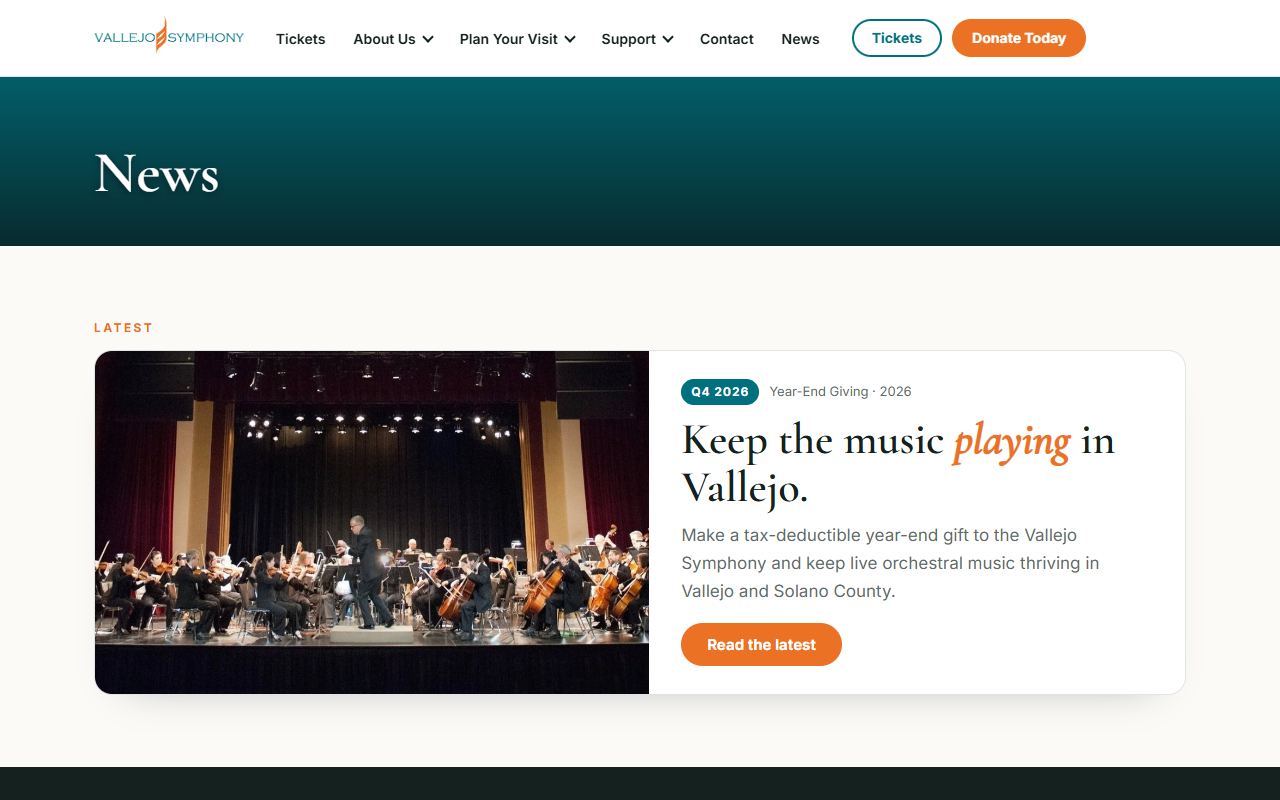
Each quarter’s News page does the job of a printed newsletter. Unlike paper, it never gets thrown away, it never runs out, and anyone can get to it any time.
Follow one letter, and one link
A printed letter’s journey
- 🖨We pay to print it and pay postage to mail it.
- 📬It arrives with a stack of other mail.
- 👀It might be read once, often quickly.
- 🗑It goes in the recycling bin.
- ❓Months later, when the reader thinks “I’d like to give again”, the letter, and the address to send money to, is gone.
An online News page’s journey
- 🔗We share one link by email, Facebook and text. Each extra copy costs nothing.
- 📱It opens instantly on a phone, tablet or computer.
- 💛A Donate button is right there. Giving takes about a minute.
- 🗂The link stays in their email, their Facebook and their browser’s history.
- 🔁Months later they can find it again, or find it on Google, and give again.
A printed newsletter is a flyer handed out once. A News page is a book placed on a library shelf. Every quarter adds a new volume to the shelf, and the shelf is open to everyone, all day and all night, for years.
What “stored in their history” means
Phones and computers quietly remember the pages a person has visited. This list is called their browsing history. Emails stay in their inbox, and Facebook posts stay on their page. So a donor who read our year-end page in December can find it again in June by:
- searching their email for “Vallejo Symphony”,
- scrolling back on Facebook,
- starting to type “vallejo” in their browser, which suggests pages they’ve visited before, or
- simply searching Google for “Vallejo Symphony donate”.
Every one of those roads leads back to a page with a working Donate button. A paper letter has no road back once it’s been thrown away.
Paper and online, side by side
| Printed letter | Online News page | |
|---|---|---|
| Cost of each extra reader | Printing plus postage, every time | Nothing. Share it with 10 people or 10,000. |
| How long it lasts | Until it’s thrown away | Stays online for years, in the News history |
| Giving | Find a checkbook, an envelope and a stamp | Tap “Donate”. Secure, about a minute. |
| Passing it on | Hand the paper to one person | Forward the link to anyone, anywhere, instantly |
| Fixing a mistake | Too late once it’s mailed | Corrected in minutes, for everyone |
| Found by strangers | Only by whoever receives it | Google can show it to people searching for music in Vallejo |
| Easy to read | Fixed print size | Readers can enlarge the text, or have their device read it aloud |
| Photos and video | Printing color is expensive | Color photos at no extra cost |
This doesn’t mean we stop mailing letters. Some of our most loyal supporters love paper. The best approach uses both: a printed letter that also shows the web address (or a QR code, see Part 7), so it leads people to the page that never gets thrown away.
The quarterly giving pages
Four times a year, the symphony gets one special page with its own simple web address. This year-end’s page is vallejosymphony.org/q42026.
“q4 2026” just means “the 4th quarter (October to December) of 2026”. Next comes q12027 (January to March 2027), then q22027, and so on. Each page tells that season’s story and asks for support, with one big, clear button to give.
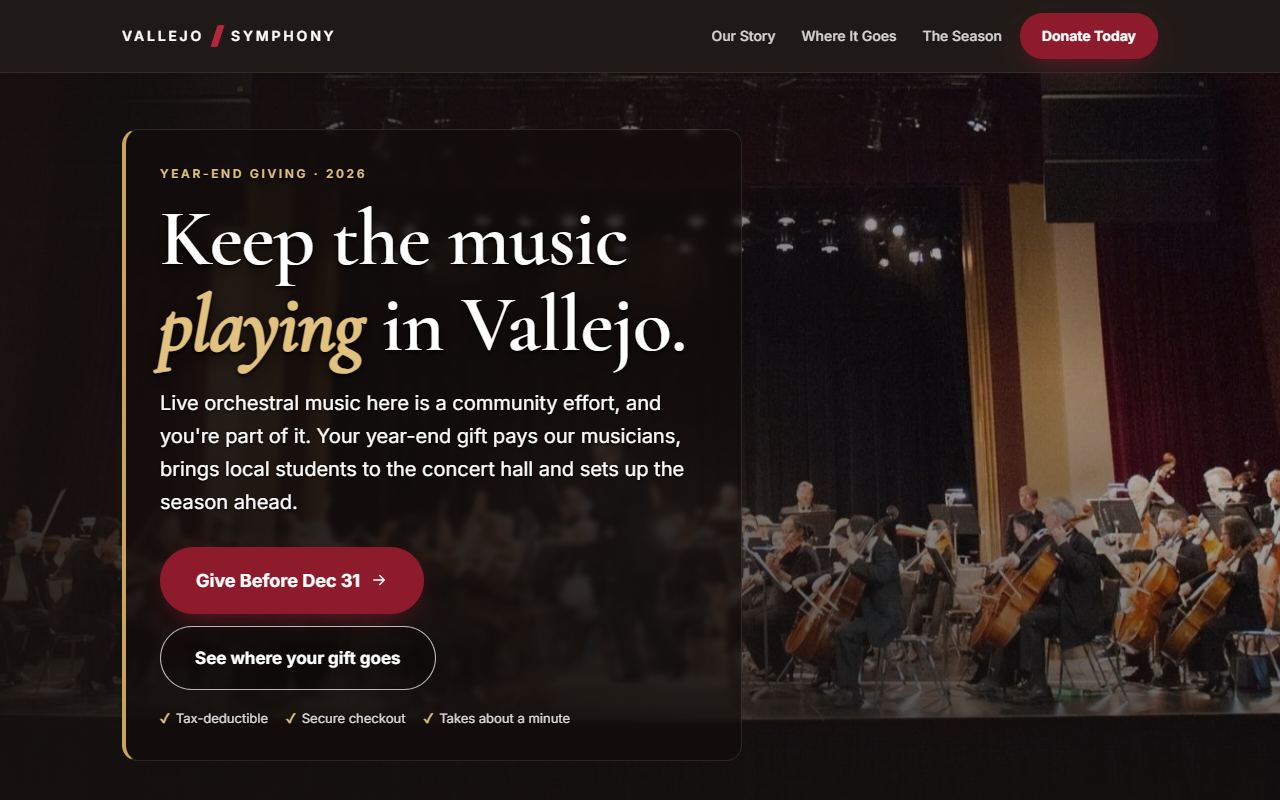
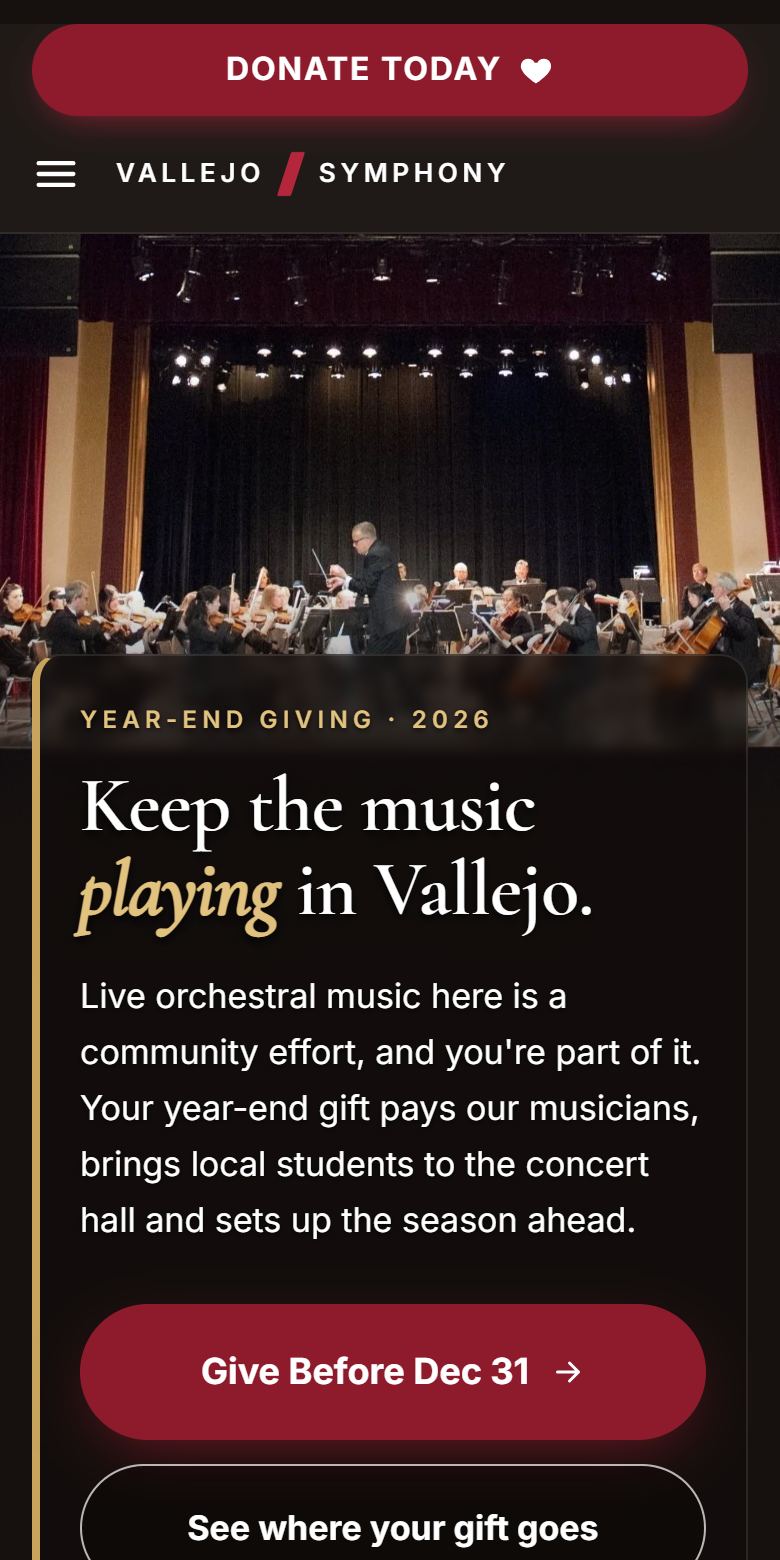
Why one page per quarter works so well
- One message, one action. People give more when they’re asked clearly, once, without distractions.
- Made for phones. Most people now read email and Facebook on their phones. These pages are designed for a phone screen first.
- Gift examples. The page shows what different amounts do, for example how a gift helps bring Vallejo students to a concert. Donors then type their amount on the secure Arts-People checkout.
- Easy to share. One short address to put in an email, a Facebook post, a printed letter or a concert program.
- It becomes part of our history. When the quarter ends, the page moves down the News list. Its Donate button keeps working, so it can still bring in gifts.
How people find us on Google
Many people who’ve never heard of the Vallejo Symphony will first meet us through a Google search. Helping Google show us to those people is called SEO, short for “search engine optimization”.
Imagine Google as a tireless librarian who reads every page on the internet. When someone asks, “What concerts are there in Vallejo?”, the librarian hands them the pages that best answer the question.
The librarian prefers pages that are clear, up to date, about the exact topic, and recommended by others. SEO simply means making our pages the kind the librarian likes to hand out.
How the News pages help
- Fresh pages, regularly. A new page every quarter shows Google that the symphony is active and its information is current. A website that never changes looks abandoned.
- Every page is a new front door. Each quarterly page talks about specific concerts, musicians, students and Vallejo itself. Each of those topics is another search where the symphony can show up.
- Local words. The pages use the words real people type, such as “Vallejo”, “Solano County”, “orchestra”, “concert” and “donate”, so Google knows to show us to people nearby.
- It all adds up. Paper newsletters vanish. Online pages pile up into a growing library about the symphony, and a bigger library gives the librarian more reasons to point people our way.
- Built the way Google likes. The pages load quickly, read well on phones and are clearly labeled behind the scenes, all of which Google rewards.
SEO is a slow, steady garden, not a light switch. It takes months for Google to notice and trust a website, and each quarterly page is another seed planted.
Word of mouth, online: “backlinks”
The symphony has always grown by word of mouth. On the internet, word of mouth takes the form of links.
A backlink is when another website links to ours. For example, the City of Vallejo’s events page might say “See the Vallejo Symphony’s new season” and send readers to our News page.
A backlink is a letter of recommendation. When a respected local organization recommends us, two good things happen. Their readers come to visit, and Google’s librarian takes note: “If the city, the newspaper and the schools all point to this symphony, it must be worth showing people.”
Why the News pages make backlinks easier
People link to things that are specific and current. “Here’s the symphony’s winter update about bringing students to hear Beethoven” is much easier to share than “here’s the symphony’s home page”. Every quarter, we give our partners something new and specific to point to.
Who could link to us
- The City of Vallejo and Visit Vallejo (community and tourism event listings)
- Local newspapers and online community calendars
- Schools and music teachers whose students attend our concerts
- Our sponsors and partners, on their own websites
- Our musicians, soloists and Music Director, on their personal websites
- Churches, libraries and community groups that share local happenings
Asking for a link is just a modern version of asking someone to put up our poster. Board members’ personal connections are one of the most valuable things we have here.
The control panel, step by step
The control panel lives at updates.vallejosymphony.org. Only approved email addresses can get in. Here’s what it looks like.
Step 1: Sign in with a code, not a password
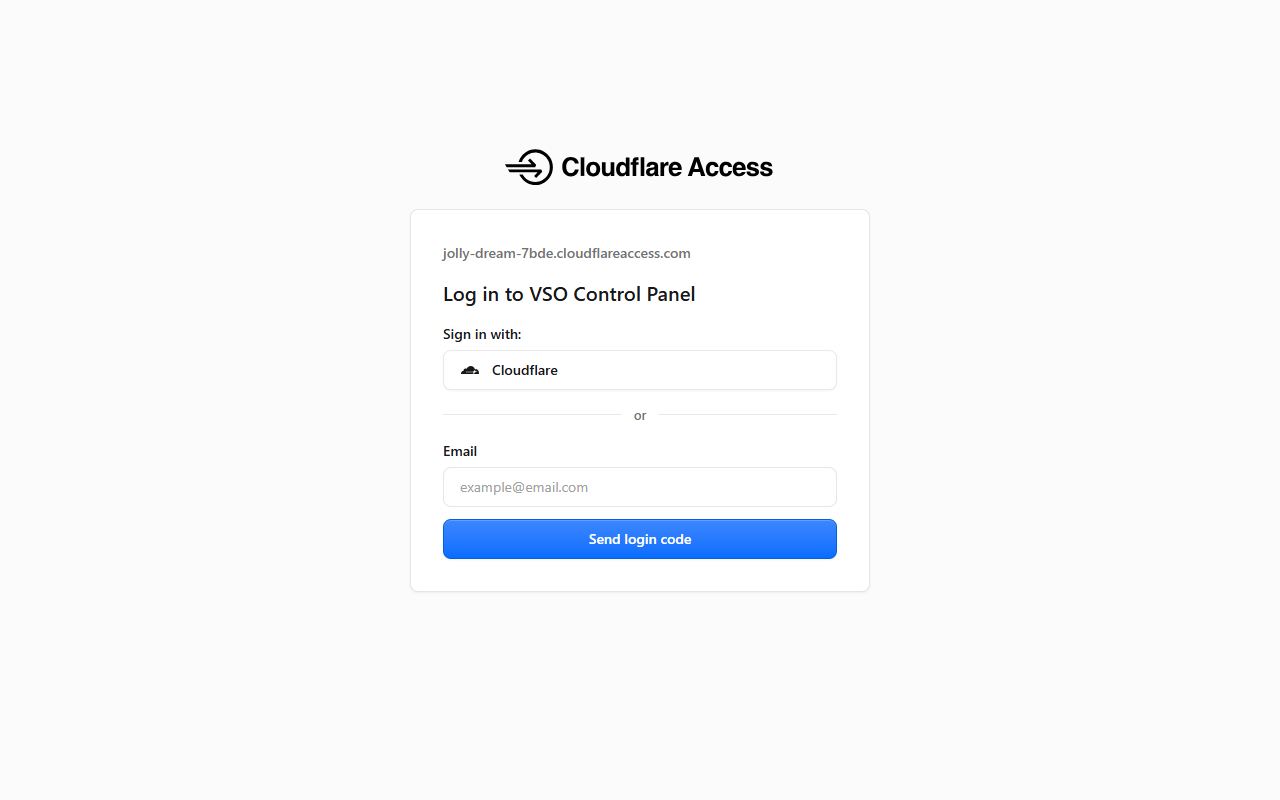
- Type your email address and click Send login code.
- Check your email. A message with a 6-digit code arrives within a minute. If it doesn’t, look in the Spam folder.
- Type the code into the page. You’re in, and you stay signed in for 24 hours.
It’s like a doorman who checks the guest list, then hands you a key that only works once. There’s no password to remember, write down or lose, and a stranger can’t guess their way in.
Step 2: The home screen
Step 3: Help is one click away, everywhere
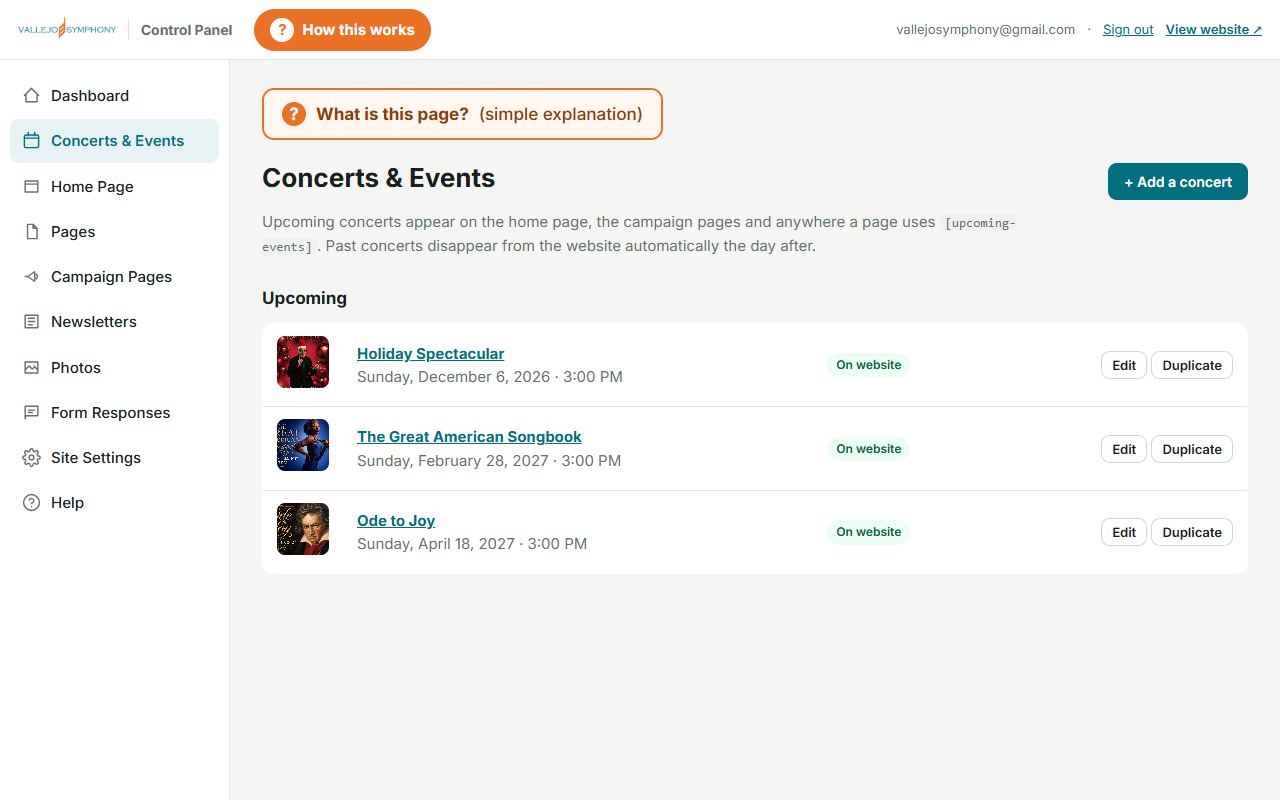
Step 4: Make a change
- Click a section on the left, for example Concerts & Events.
- Click Edit next to the item you want to change.
- Type in the boxes, just like filling out a form.
- Click Save. The change appears on the website right away.
What each section is for
- Concerts & Events
- The concerts listed on the home page. Past concerts disappear by themselves the day after.
- Home Page
- The big photo and welcome words at the top of the website.
- Pages
- All the other pages: Tickets, Who We Are, Contact and more.
- Campaign Pages
- The quarterly giving pages. Each one is either a Draft (private) or Live (public).
- Newsletters
- Upload each quarter’s newsletter here, for the AI assistant to turn into a draft page.
- Photos
- The picture library. Upload once, use anywhere.
- Form Responses
- Messages from the website’s Contact and Volunteer forms, and newsletter sign-ups.
- Site Settings
- Phone number, address, and where the Tickets and Donate buttons lead.
- Help
- Common questions, plus a box to ask your own.
Step 5: Stuck? Ask.
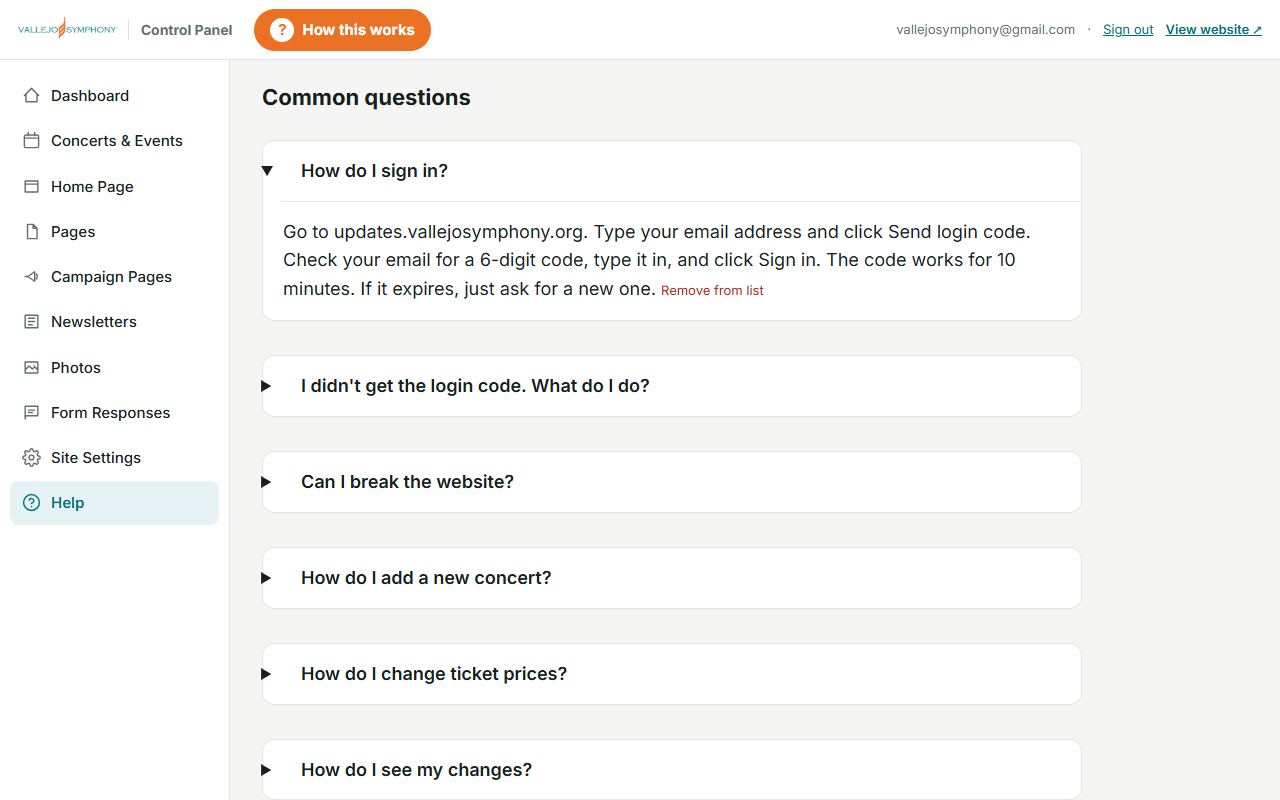
Our new quarterly routine
Here’s how one quarter’s update goes from idea to donations, and who does what.
Write the newsletter Staff & board
Just as you always have: the season’s news, the concerts ahead and what support makes possible.Upload it Anyone signed in
In the control panel, go to Newsletters, choose the file, enter its date and click Upload. Add notes if you like, such as “feature the February concert”.The AI assistant drafts the page Claude, the AI assistant
It reads the newsletter and writes a draft of that quarter’s page in the same style as the last one: headline, story and gift examples.Check the draft privately Board & staff
The draft appears on the private practice site, where only signed-in people can see it. Read it, ask for changes, or make them yourself.Publish it One click
In Campaign Pages, change the status from Draft to Live and click Save. It’s now public and at the top of the News page.Share the link Everyone
Facebook, email, text messages, printed letters (with a QR code) and announcements from the stage.Gifts come in Donors
Through the secure Arts-People checkout, just as before.It joins the history Automatic
Next quarter, the new page takes the top spot. This one moves down the News list, still online, its Donate button still working.
Problems this solves
Each change answers a real, everyday problem.
Becoming “AI ready”
You’ve probably heard a lot about “AI”. Here’s what it means for the symphony, simply.
AI (artificial intelligence) here means a computer program that can read and write in everyday language. You can ask it a question the way you’d ask a helpful, very well-read assistant, and it writes back an answer. The one we use is called Claude.
How the symphony already uses it
- Drafting quarterly pages. It reads the uploaded newsletter and writes a first draft of that quarter’s page. That saves hours of work, and people still review and approve every word.
- Answering questions. In the control panel’s Help section, you can type a question like “How do I change a concert date?” and get a plain, step-by-step answer.
Why being “AI ready” matters for the future
- People are starting to ask AI instead of searching. More and more people ask AI assistants, such as the ones built into Google, phones and computers, questions like “What classical concerts are near Vallejo this spring?” These assistants read websites to find the answer. A clear, up-to-date, well-organized website means they answer correctly, and point people to us.
- Our information is now neatly organized. Concerts, pages, newsletters and help questions are stored in a tidy, labeled way (a database, which works like a very orderly filing cabinet). That makes it easy for future tools to use it: for example, drafting Facebook posts for each concert, writing thank-you notes, or offering pages in Spanish for more of our community. None of these are set up yet, but the groundwork is.
- The team learns as it goes. Every question asked in Help is saved, and the good answers become common questions for the next person.
AI is a helper, not a decision-maker. Anything it drafts for a quarterly page stays private until a person reviews it and clicks to make it public. Board members and staff have the final say.
Safety, cost and who’s in control
- Only approved people can make changes. The control panel and the practice site only open for email addresses on the approved list, using a one-time code.
- You can’t break the website. Every change can be changed back. Quarterly pages start as private drafts.
- Everything is kept. Form responses, newsletters, help questions and a list of recent changes (who changed what, and when) are all stored.
- Safe, fast and secure. Cloudflare protects the website from attacks and keeps it quick to load anywhere. Your connection to the site is always private and encrypted, which is what the little padlock in your browser means.
- Low cost. At our size, the website runs on Cloudflare’s free plan. If it ever grows past that, the paid plan is about $5 a month. The AI help costs a penny or two per question, once its account is connected.
- Email and donations are unchanged. Symphony email works as before, and gifts still go through Arts-People’s secure checkout.
- A safety net while we settle in. We kept the old Squarespace subscription for a short while as a backup, and saved a copy of the old settings. Once the board is comfortable, it can be cancelled.
What the board can do now
You don’t need to become a computer expert. A few small actions make a big difference.
- Visit the website at vallejosymphony.org and click News in the top menu.
- Share this quarter’s page (vallejosymphony.org/q42026) with five friends by email or Facebook. Copy, paste, send.
- Ask one organization you know (a school, church, business or club) to link to our News page from their website.
- Add the web address or a QR code to the next printed letter and concert program.
- Mention it from the stage: “Find our latest news at vallejosymphony.org/news.”
- Keep sending the newsletter content each quarter. It now goes much further.
- Try the control panel with a staff member beside you, and click a “What is this page?” button.
- Ask questions in the control panel’s Help box. There are no silly questions, and every answer helps the next person.
Word list
Every new term from this guide, in alphabetical order.
- AI (artificial intelligence)
- A computer program that can read and write in everyday language, like a well-read assistant. Ours is called Claude.
- Arts-People
- The company that runs our ticket and donation checkout. Unchanged.
- Backlink
- A link from someone else’s website to ours. The online version of a recommendation.
- Browser
- The program you use to view websites: Chrome, Safari, Edge or Firefox.
- Browsing history
- The list of web pages your phone or computer remembers you visited.
- Cloudflare
- The company whose service now runs our website and keeps it fast and safe.
- Control panel
- The private page (updates.vallejosymphony.org) where approved people change the website.
- Database
- An orderly electronic filing cabinet where the website keeps concerts, pages and messages.
- Domain
- The symphony’s name on the internet: vallejosymphony.org.
- Draft / Live
- Draft means private, for review only. Live means public, so everyone can see it.
- Facebook / Instagram
- Popular social media apps where people share news, photos and links.
- Google / search engine
- A free service that finds web pages when you type a few words.
- Link
- A clickable web address that takes you to a page.
- Login code
- A one-time 6-digit number emailed to you to sign in. It replaces a password.
- News page
- The page on our website listing every quarterly update, newest first.
- Pixel (tracking)
- A counter that shows how many people came from a Facebook ad, and whether they gave.
- Post
- A message shared on social media.
- Preview card
- The photo, headline and summary that appear when a link is shared.
- Preview / practice site
- preview.vallejosymphony.org: a private copy for checking drafts before they go public.
- QR code
- A square barcode that opens a web page when you point a phone camera at it.
- Quarter (q4 2026)
- A three-month season of the year. q4 2026 means October to December 2026.
- SEO
- “Search engine optimization”: making our pages easy for Google to find, understand and recommend.
- Share
- Passing a post or link on to others with a click.
- Squarespace
- The company we used to rent our website from.
- Upload
- Sending a file (like a newsletter or photo) from your computer to the website.
- Web address (URL)
- The “street address” of a web page, such as vallejosymphony.org/news.
- Website
- A collection of pages on the internet. Our brochure, program and box office, open around the clock.
Facebook, email and sharing made easy
With one link per quarter, sharing the symphony’s story takes about 30 seconds: copy the link, paste it, press Send.
What people see when we share a link
We built every page so that when its link is pasted into Facebook, an email or a text message, it automatically turns into an attractive “preview card”: a large photo, the headline and a short description. People are far more likely to stop and click on a picture than on a plain web address.
Sponsored · 🌐
An illustration of how our year-end page appears when shared on Facebook.
A few social media words
How this helps every kind of sharing